Direct answer
Yes, Google Voice can work for simple AI receptionist routing.
Google Voice is most realistic when the AI receptionist only needs a narrow path such as missed-call recovery, after-hours intake, or owner handoff. It is weaker when the business needs SIP/BYOC, advanced queues, call-center reporting, custom LiveKit agents, CRM writes, or robust failover.
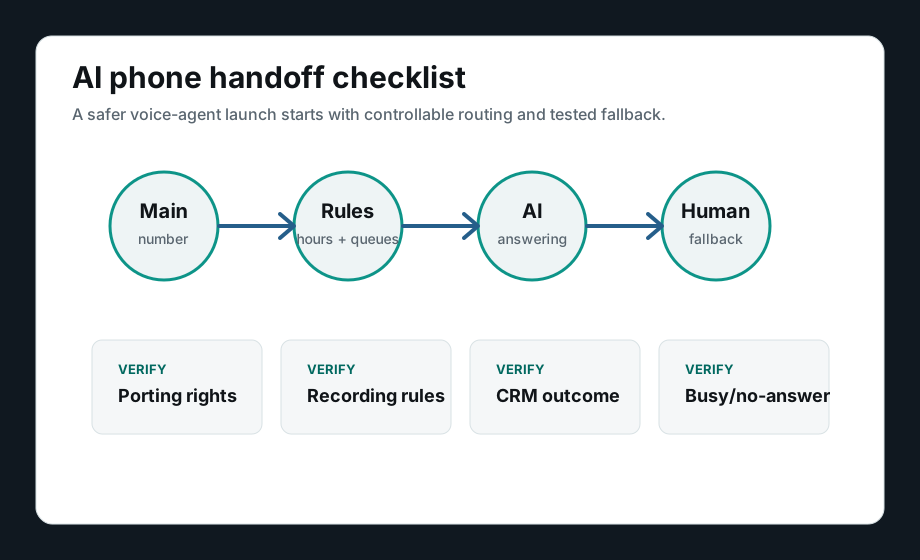
Test forwarding, caller ID, no-answer behavior, logs, and human fallback before moving production calls.This guide connects Google Voice to the broader phone-system decision: simple app-first phones, SIP infrastructure, LiveKit voice agents, implementation ownership, and human fallback.
When Google Voice is enough, and when it is not
Verify these controls before using Google Voice with AI
Confirm number control
Know who owns the number, whether it can port later, and whether forwarding can be changed without breaking the main business line.
Test forwarding and no-answer behavior
Place real calls through business-hours, after-hours, busy, declined, voicemail, and no-answer states before trusting AI intake.
Check caller ID and call logs
Make sure the AI path preserves enough caller identity and call history for the team to follow up correctly.
Define the human fallback
Name who receives urgent, unclear, angry, sensitive, failed-tool, or low-confidence callers.
Map the CRM or calendar outcome
Decide whether the AI receptionist should only summarize calls or also create leads, tasks, tickets, bookings, or callbacks.
Know when SIP becomes necessary
Move beyond Google Voice when the buyer needs custom routing, LiveKit, carrier control, failover, call recording policy, or deeper observability.
Best next path after the Google Voice check
Stay simple
Use Google Voice only for a narrow first path
Good fit when the business has one main number, simple owner handoff, basic after-hours intake, and no deep CRM or call-center routing needs.
Review Google VoiceUpgrade small-team workflow
Compare app-first phone alternatives
Better fit when the business needs shared ownership, texts, team inbox behavior, clearer call history, and a more modern small-business phone workflow.
Compare Google Voice alternativesBuild custom AI voice
Move toward SIP, LiveKit, or implementation support
Better fit when the AI receptionist needs SIP/BYOC, LiveKit rooms, CRM writes, transfer packets, monitoring, and trained human fallback.
Choose the phone-system pathImplementation option
Need to keep Google Voice temporarily while testing AI intake?
A safe first test can use the current number path while the buyer maps fallback, CRM outcomes, scripts, escalation rules, and the migration plan if Google Voice proves too limited.
Map the first AI receptionist route